ESP32-S3

Specifications

  • Based on the ESP32-S3-WROOM-1 module
  • Working voltage: 3.3~5V
  • IO ports: 36 IO ports
  • Flash:N16R8 (16M)
  • PSRAM:N16R8 (8M)
  • 2 I2C, 4 SPI interfaces
  • Size: 57mm * 28mm
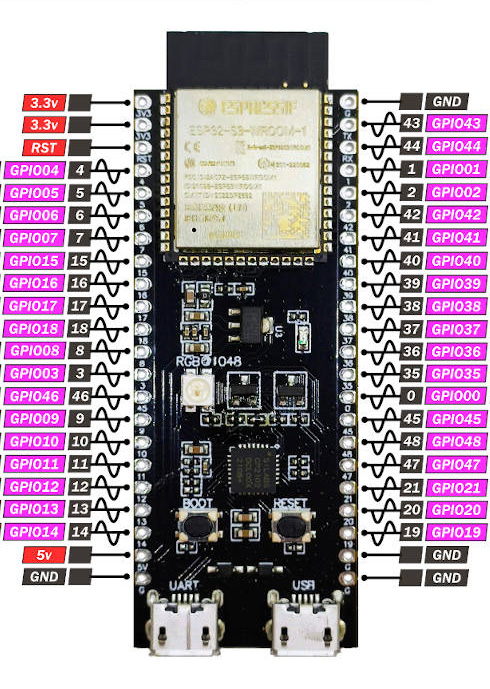
  • Onboard WS2818RGB, at pin 48.
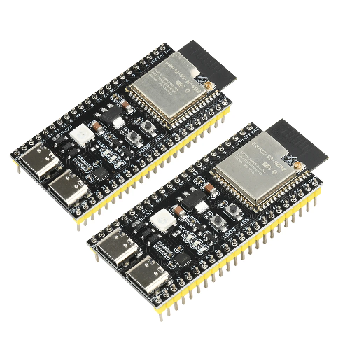
  • Two Type-C interfaces: one can be used directly with a COM tag, and the other USB can be powered on using OTG or by holding down BOOT to display the port and download the program.

Pin out diagram

Setup instructions

Using GPIO

External LED or pin on/off

import machine, time

# Using GP28
led = machine.Pin(28, machine.Pin.OUT) 
while True:
    print("blink!")
    led.on()
    time.sleep(0.2)
    led.off()
    time.sleep(0.2)

Detect button press

import machine, time

# Using GP27 and 3.3V for button
button = machine.Pin(27, machine.Pin.IN, machine.Pin.PULL_DOWN)
print("Waiting...")
while True:
    if button.value():
        print("Button pressed")
        time.sleep(0.3)
    time.sleep(0.1)

If you are connecting the button between a GPxx pin and GROUND, you will need to invert your button.value() logic. That is, use if not button.value(): and set the built-in resistor to machine.Pin.PULL_UP.

import machine, time

# Using GP27 and GND for button
button = machine.Pin(27, machine.Pin.IN, machine.Pin.PULL_UP)
print("Waiting...")
while True:
    if not button.value():
        print("Button pressed")
        time.sleep(0.3)
    time.sleep(0.1)

Servo 9G

import time
from machine import Pin,PWM

servo1 = PWM(Pin((0)), freq=50)

# Move to 90 degrees
servo1.duty(int(30 + (90 / 180) * (125 - 30)))
time.sleep(1)

# Move to 0 degrees
servo1.duty(int(30 + (0 / 180) * (125 - 30)))
time.sleep(1)

# Move to 180 degrees
servo1.duty(int(30 + (180 / 180) * (125 - 30)))
time.sleep(1)

Neopixels

Using the MicroPython Neopixel library

import machine
import neopixel
import time

led = neopixel.NeoPixel(machine.Pin(48), 1)
print("Police lights!")
while True:
    led[0] = (255,0,0)
    led.write()
    time.sleep(0.25)
    led[0] = (0,0,255)
    led.write()
    time.sleep(0.25)

There is also a .fill() method available to set all LEDs to a single color.

Networking

Connect to wifi

from WIFI import WIFI

networks = (("SCWiFi","wifi1234"),) # Wifi network and password
wifi = WIFI(networks)
ip = wifi.connect()                # Connect to the wifi network
wifi.ntptime()                     # Fetch current time

Get current date/time

  • Requires an active Internet connection over wifi (as per above)
import time
from WIFI import WIFI

# Connect to Wifi and fetch the current time
networks = (("SCWiFi","wifi1234"),) # Wifi network and password
wifi = WIFI(networks)
ip = wifi.connect()                # Connect to the wifi network
wifi.ntptime()                     # Fetch current time

# Get the current time as a tuple variable
# Format: (Year, Month, Day, Hour, Minute, Second, Weekday, Day_of_Year)
now = time.localtime()

# We can pick out specific pieces of time using their index! (Count from 0)
# Index [3] is the Hour (in 24-hour format: 0 to 23)
# Index [4] is the Minute (0 to 59)
# Index [5] is the Second (0 to 59)
current_hour = now[3]  
current_minute = now[4] 
print("The time is", current_hour, ":", current_minute)

Example using a NeoPixel as an alarm clock

import time
import machine
import neopixel
from WIFI import WIFI

# Connect to Wifi and fetch the current time
networks = (("SCWiFi","wifi1234"),) # Wifi network and password
wifi = WIFI(networks)
ip = wifi.connect()                # Connect to the wifi network
wifi.ntptime()                     # Fetch current time

# Setup the NeoPixel 
led = neopixel.NeoPixel(machine.Pin(48), 1)

while True:
    # Read the clock
    now = time.localtime()
    hour = now[3]
    minute = now[4]
    
    # Check if it's 14:30 (2:30 PM in 24-hour time)
    if hour == 14 and minute == 30:
        print("Time's up! Flashing the light!")
        
        # Flash Blue
        led[0] = (0, 0, 255)
        led.write()
        time.sleep(0.5) # Wait half a second
        
        # Turn Off
        led[0] = (0, 0, 0)
        led.write()
        time.sleep(0.5)        
    else:
        # If it's not the right time, print a status and sleep
        print("Waiting... Current time ->", hour, ":", minute)        
        # Wait 10 seconds before checking the clock again
        time.sleep(10) 

Asking for Information (eg, Dad joke)

import requests # Use 'urequests' if running on ESP32
import json
from WIFI import WIFI

# Connect to Wifi and fetch the current time
networks = (("SCWiFi","wifi1234"),) # Wifi network and password
wifi = WIFI(networks)
ip = wifi.connect()                # Connect to the wifi network
wifi.ntptime()                     # Fetch current time

# Fetch data from a web URL
response = requests.get("https://icanhazdadjoke.com/", headers={"Accept": "application/json"})

# Check if it worked (200 means OK!)
print(response.status_code) 

# Show me the joke
data = ujson.loads(response.text)
print(data["joke"])

Asking for Information (eg, Weather)

import requests # Use 'urequests' if running on ESP32
import json
from WIFI import WIFI

# Connect to Wifi and fetch the current time
networks = (("SCWiFi","wifi1234")) # Wifi network and password
wifi = WIFI(networks)
ip = wifi.connect()                # Connect to the wifi network
wifi.ntptime()                     # Fetch current time

# Documentation is at
# https://data.gov.hk/en-data/dataset/hk-hko-rss-current-weather-report
url = "https://data.weather.gov.hk/weatherAPI/opendata/weather.php?dataType=rhrread&lang=en"
response = requests.get(url, headers={"Accept": "application/json"})


if response.status_code == 200:
    # Extract the info we want from the data returned.
    # To solve this requires studying the documentation from 
    # the API provider (in this case HKO)
    data = json.loads(response.text)
    rainfall = data['rainfall']['data'][6]['max'] # Sha Tin district
    temperature = data['temperature']['data'][6]['value'] # Sha Tin district
    humidity = data['humidity']['data'][0]['value'] # HK region


    print("Rainfall the past hour: ",rainfall,"mm")
    print("Current temperature: ",temperature,"°C")
    print("Humidity: ",humidity,"%")

Send a message via ntfy

import requests # use urequests for micropython

requests.post("https://ntfy.sh/your-channel-id", data="This is your message")

ESP NOW

ESP NOW is a wireless protocol specifically for ESP devices to create a mesh network.

import machine
import time
import stc
import espnow

# Button
button = machine.Pin(4, machine.Pin.IN, machine.Pin.PULL_DOWN)

# Setup ESPNow
e = espnow.ESPNow()
e.active(True)
peer = b'\xff\xff\xff\xff\xff\xff' # Broadcast address
e.add_peer(peer) # Add as peers any devices you wish to transmit to

# Let's go
points = Points()
while True:
    sender, msg = e.irecv(200)
    if msg:
        print(f"Message received from {sender}: {msg}")
    if button.value():
        print("Broadcasting hello")
        e.send(peer, 'Hello'.encode('utf-8'))
    time.sleep(0.2)

Note: To convert a MAC address string like “AB:12:34:CD:56:78” into the format required by the espnow.ESPNow.add_peer() method, which requires a bytes object, you can follow these steps:

mac = "AB:12:34:CD:56:78"
peer = bytes(int(part, 16) for part in mac.split(':'))
print(peer)  # Output: b'\xab\x12\x34\xcd\x56\x78'

Copyright © Paul Baumgarten.