Unplugged 02
Lesson 2: Flowchart Detectives
Big idea: A flowchart is a picture of an algorithm. Instead of writing instructions as words, we draw boxes and arrows that show exactly how a process flows — including decisions and loops.
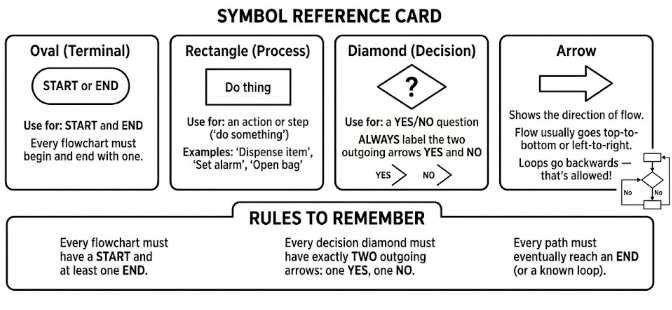
Symbol Reference Card
Cut and glue into your journal to keep it as a handy reference throughout the term.
Flowcharts
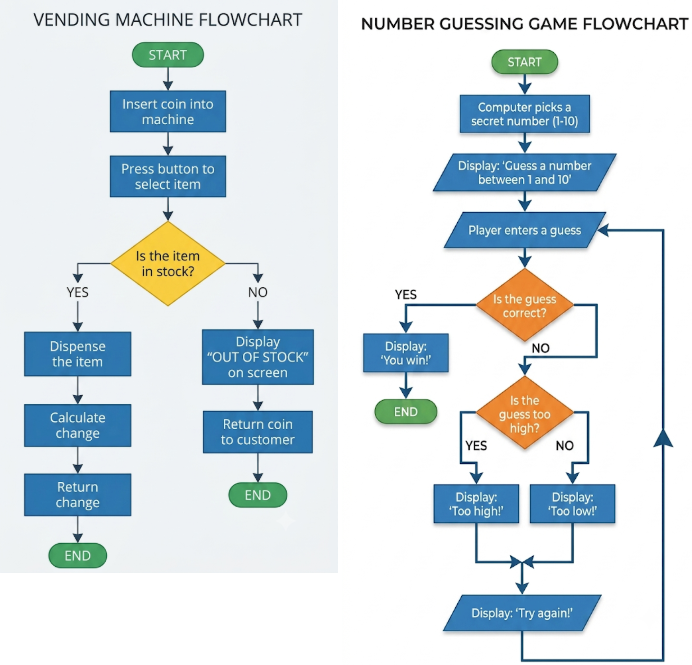
VENDING MACHINE FLOWCHART:
Scenario A1: You insert a coin and select item B3, which IS in stock.
- At "Is the item in stock?" you take the __________ branch.
- Final output: ___________________________________________
Scenario A2: You insert a coin and select item D1, which is OUT OF STOCK.
- At "Is the item in stock?" you take the __________ branch.
- Final output: ___________________________________________
Scenario A3: You insert a coin and select item A2, which IS in stock. List every step you take in order:
Step 1: ____________________________________________________
Step 2: ____________________________________________________
Step 3: ____________________________________________________
Step 4: ____________________________________________________
Step 5: ____________________________________________________
Final output: ______________________________________________
NUMBER GUESSING FLOWCHART:
Scenario B1: Secret number is 7. Player guesses: 4, then 9, then 7.
Guess 1 (4): Is it correct? _____ Message shown: ___________________
Guess 2 (9): Is it correct? _____ Is it too high? _____ Message shown: ___________________
Guess 3 (7): Is it correct? _____ Message shown: ___________________
Scenario B2: Secret number is 2. Player guesses: 5, then 2.
Guess 1 (5): Message shown: ___________________ Guess 2 (2): Message shown: ___________________
Scenario B3: Secret number is 10. Player guesses 10 immediately. Steps taken:
Step 1: _____________________________________________________
Final output: ______________________________________________
Thinking question: Could this flowchart ever run forever? When would the game end?
Now swap sheets with a partner who did the OTHER flowchart.
Execute their flowchart using the same test scenarios. Do you get the same answers?
YES / NO — different at: ______________________
Activity 2 — Create Your Own Flowchart
Choose ONE of the four scenarios below. Draw your flowchart in your journal. Use the correct symbols from the reference card.
Scenario 1 — Lunchtime Decision You need to decide what to do at lunchtime. First: is it raining? If yes, go to the cafeteria. If no: is there a sports game on? If yes, go watch the game. If no, go to the courtyard.
Scenario 2 — Library Late Fee A student returns a library book. You need to calculate the fine. 0 days overdue = no fine. 1–14 days = small fine (5hkd). 15–30 days = medium fine (20hkd). More than 30 days = contact parents.
Scenario 3 — Getting Ready for School (harder — has loops!) Alarm goes off. Is it a school day? (If NO: go back to sleep, loop back.) If YES: have a shower. Is your uniform clean? (If NO: find an alternative.) Eat breakfast. Is your bag packed? (If NO: pack it.) Leave the house. END.
Scenario 4 — Troubleshooting a Computer (harder — has loops!) Computer won't turn on. Is it plugged in? (NO: plug it in → start again.) Is the power strip switched on? (NO: turn it on → start again.) Press power button. Does the power light come on? (NO: faulty power supply — contact IT → END.) Is the screen connected? (NO: connect screen.) Does the screen display anything? (NO: screen may be broken → END.) Computer is working → END.
I am doing Scenario: _____
Checklist before you start drawing:
- [ ] I know what my START is
- [ ] I know what all possible END points are
- [ ] I know how many decisions (diamonds) I need
- [ ] Every decision will have a YES path and a NO path
Partner Test
Swap your completed flowchart with a partner. Execute their flowchart using a test case you make up.
Flowchart I am testing: My partner's scenario _____
My test case (what inputs am I using?):
Steps I followed (write the sequence of boxes you moved through):
1. ___________________________________________
2. ___________________________________________
3. ___________________________________________
4. ___________________________________________
5. ___________________________________________
6. ___________________________________________
Final output / result: ___________________________________________________
Did the flowchart work correctly? YES / NO
If NO — what went wrong?
Reflection Questions
1. What are the four flowchart symbols? Fill in the table:
| Symbol shape | Name | What it means |
|---|---|---|
| Oval | ||
| Rectangle | ||
| Diamond | ||
| Arrow |
2. Why must every path through a flowchart eventually reach an END?
3. What is a loop in a flowchart? Give an example from one of the flowcharts in this lesson.
4. What made your partner's flowchart easy or hard to follow?
5. How is a flowchart similar to the navigation instructions you wrote in Lesson 1? How is it different?
Extension Challenges
A. Take your flowchart and rewrite it as a numbered list of instructions (like the Programmer's Notepad from Lesson 1). Which version is easier to understand — the flowchart or the list?
B. Flowchart B (the guessing game) loops forever if the player never guesses correctly. Add a "maximum number of guesses" feature — after 5 wrong guesses, the computer reveals the answer and the game ends. Draw the modified flowchart.
C. Can you make a flowchart for something that currently has no flowchart in your life — like your after-school routine, or how you decide what to watch on TV? Try it.